Scene import
The first step after creating a new project is to upload a 3D scene. Edro supports several file formats, and you can find implementation details for each one below.
Once you upload a 3D scene, continue with showcase settings.
.gltf / .glb (GL Transmission Format)
Section titled “.gltf / .glb (GL Transmission Format)”glTF (GL Transmission Format) is a file format for 3D scenes, designed to be efficient and compatible with various web and native platforms. It is an open standard developed by The Khronos Group.
.glb files are a binary format that typically contain both the scene description and all its dependencies (geometry, textures, etc.), so simply uploading the .glb file to Edro is sufficient.
However, .gltf files often store geometry and textures in separate files. When selecting .gltf files to upload to Edro, make sure to also select all their dependent files (such as .bin, .jpg, .png, etc.).
Edro supports all features of the core glTF 2.0 format, as well as the following extensions:
- EXT_mesh_gpu_instancing
- KHR_animation_pointer
- KHR_draco_mesh_compression
- KHR_lights_punctual
- KHR_materials_emissive_strength
- KHR_materials_ior
- KHR_materials_sheen
- KHR_materials_specular
- KHR_materials_transmission
- KHR_materials_unlit
- KHR_materials_volume
- KHR_texture_transform
.blend (Blender)
Section titled “.blend (Blender)”.blend files are used by the open-source 3D modeling program Blender, maintained by the Blender Foundation.
You can upload .blend files to Edro, and these will be processed on our servers using the latest available Blender LTS version.
As part of the processing, .blend files are exported to the GLB format for use in Edro. You can find details about this export implementation in the Blender manual.
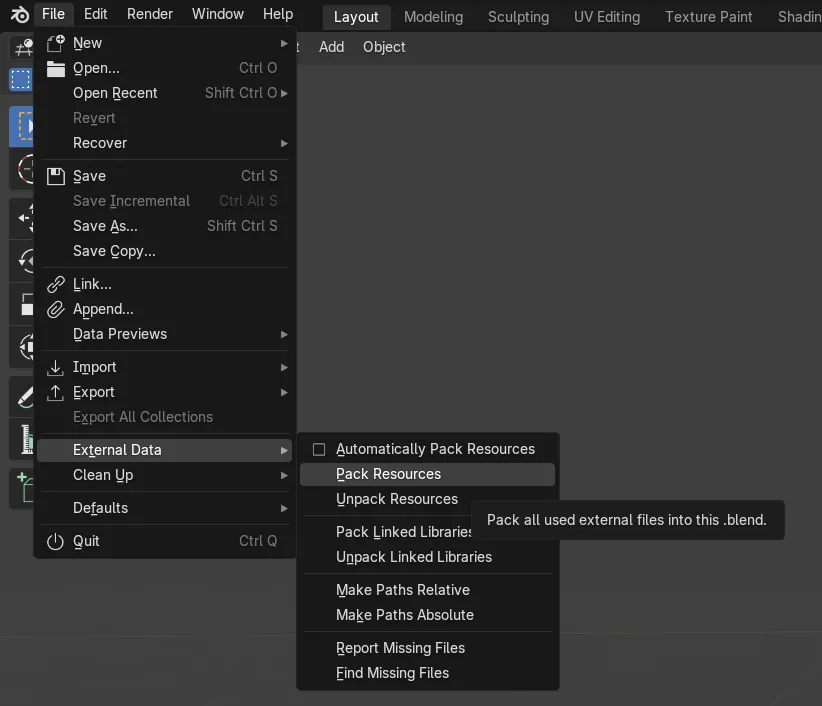
Although Blender allows you to split scene information across multiple .blend files (for example, to work with material or mesh catalogs), the Edro uploader only allows you to upload a single .blend file. Before uploading a .blend file, make sure it includes all scene data. You can use the Pack Resources feature for this, or enable Automatically Pack Resources:
.usd / .obj / .fbx
Section titled “.usd / .obj / .fbx”USD, OBJ and FBX files are processed using latest Blender LTS (long-term support) version. The process is equivalent to importing the file into Blender LTS, and automatically exporting to GLB format. If the import result is not as desired, we recommend performing this process manually to identify problems or areas for improvement.